by Technology Solve · managed security for small business
Protection for your devices, your offices and your remote team.
One app keeps every phone and PC safe on any network, replaces the exposed remote-access VPN, and filters whole networks: offices, schools and hotels. Technology Solve runs it for you.
No hardware to buy No browsing logs Protected the same day


Protection
Breached through a few open doors. One app closes them.
Most attacks need no clever exploit: one click, one weak network or one exposed port is enough. Shield encrypts every device's traffic and filters it through Security Solve's own servers, and the rest of the app keeps the device, and the person using it, out of trouble.
Phishing
A fake sign‑in page takes a Microsoft 365 password; the invoices get redirected.
Malware
A fake update or banking trojan steals passwords and session cookies.
Unsafe Wi‑Fi
Hotel, airport and café networks intercept or redirect traffic.
Exposed remote access
An internet‑facing VPN or RDP port is found and exploited within hours.
Shield VPN
One tap encrypts every connection and blocks ads, trackers, malware and phishing for every app. Always on, reconnects by itself, no query logs.
Malware protection
Scans every installed app and every download. New installs are checked within seconds; fake updates, fake banking apps, banking trojans and stalkerware raise an alert with Uninstall now.
Phishing protection
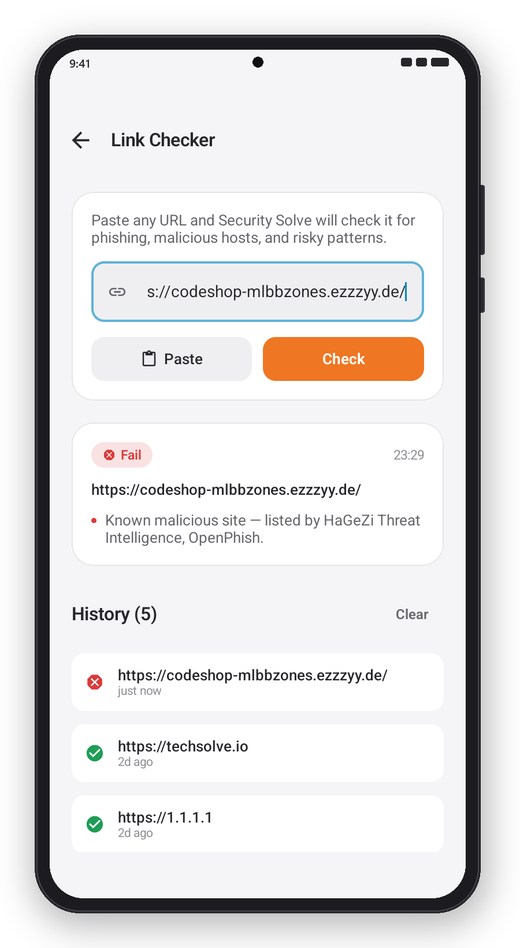
1.8 million+ known phishing and malicious sites blocked the moment Shield is on. The Link Checker answers “is this link safe?” before anyone clicks.
Live threat map
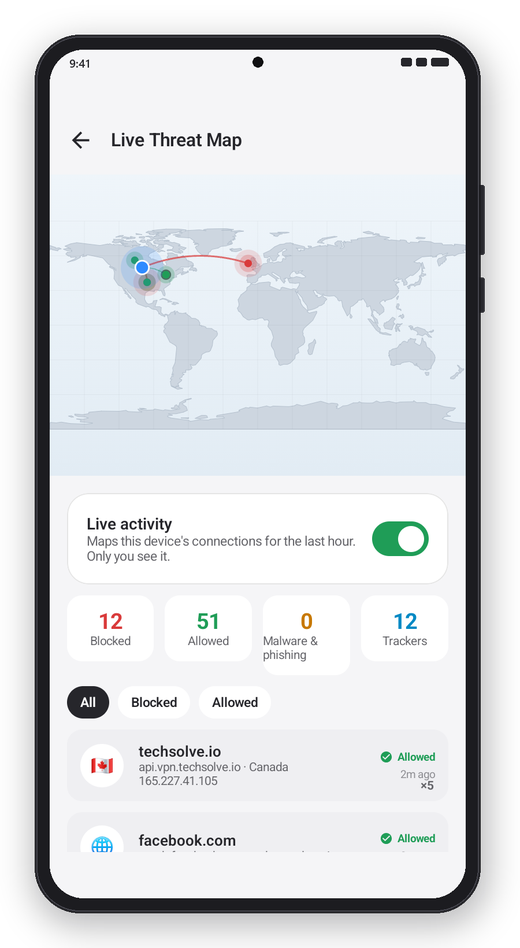
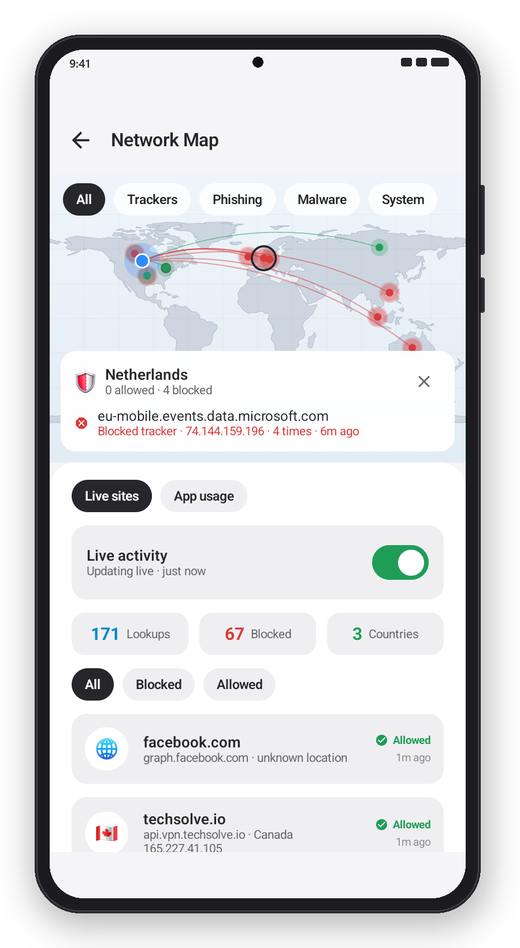
See every connection a device makes, where it goes, which app made it and what Shield blocked. Kept on the device for an hour, never stored.
Breach Monitor and Wi‑Fi Guard
Email addresses checked against known breaches daily. Open or weak Wi‑Fi gets a warning with one‑tap Turn on Shield.
Device health score
Antivirus, encryption, firewall, updates, Secure Boot and screen lock, scored 0 to 100 and reported to your portal. Unhealthy devices can be restricted automatically.
Where the app runs. Windows 10 and 11 and Android get the full app. iPhones, iPads and Macs get a secure VPN profile for the free OpenVPN Connect app: the same encrypted, filtered connection, without the on‑device scanner.
Offices and remote access
Your office, from anywhere. Nothing exposed.
Staff connect to your company's private Security Solve server and reach remote desktop, file shares, printers and line‑of‑business apps. The office never opens a port.
- A private server, just for you
In the region you choose: our Canadian cloud, your own cloud account or your own hardware. Only your people can see it.
- Offices connect out
A small gateway at each office dials out to your server: a Linux VM, a Windows Server, or your pfSense, OPNsense or MikroTik router. No open ports, no static IP, no appliance to patch.
- Least privilege by default
Give staff the whole office or only the machines you list. Link offices to each other one way, exactly as listed.
- DNS that knows your company
Internal names like rds.company.local work over the VPN exactly as they do in the office.
- Office Exit
Staff on the road can browse from the office's own internet address, for banks and portals that only let the office in. Still filtered.
Schools, hotels and shared networks
Secure DNS for schools, hotels and any shared network.
Point the network's router at Security Solve and every device on the Wi‑Fi is filtered, with nothing to install. You decide what people can look at, and you can see what was blocked.
Classrooms, labs, dorms and the devices students bring themselves. Block adult content, gambling and games, and the bypass services used to get around filters.
Guest Wi‑Fi that is safe and family‑friendly on every phone, laptop and smart TV, with malware and phishing stopped before a page loads.
Printers, TVs, scanners and visitors' phones get the same rules as staff, including the devices that can't run an app.
- Control what people can look at
Tick the categories to block, add up to ten lists of your own, and block a site for a set time or for good. An allow list always wins; malware, phishing, ads and trackers are blocked regardless.
- See what is happening
Your portal shows what was blocked and why. On a private server, an optional access log shows who looked up what and by which rule, kept as long as you choose, with CSV export. Logging is off until you turn it on, and your people are told in the app.
- Nothing to install, hard to get around
Point the router or firewall at Security Solve and every device behind it is covered, with guides for pfSense, OPNsense, MikroTik, SonicWall and F5. Known VPN, proxy and encrypted‑DNS bypass services can be blocked, and only your registered networks get answers.

Compared
Not another VPN appliance.
Citrix NetScaler, Cisco, Palo Alto, Fortinet and Ivanti were built for enterprises with security teams. Smaller businesses get the cost and the risk without the staff to run them.
Exposure claims refer to vendor advisories and the CISA Known Exploited Vulnerabilities catalogue. The issue is the design, not the vendor: an internet‑facing service each customer must patch in time.
Company portal · run for you
Your company's Security Solve, in one place. Kept running by people.
Your IT contact signs in to see how Security Solve is protecting the company and makes everyday changes without a support ticket. Technology Solve watches, updates and supports everything behind it.

- See everything
Servers, gateways and machines with status, traffic, uptime, who is connected and what was blocked. Download a report as a spreadsheet.
- Change it yourself
Add staff, reset passwords, block sites or whole categories, bring your own lists, and block a lost laptop in seconds.
- Private by design
No browsing logs. Access logging only on your own servers, off by default, with your own retention, and your people are told.
- Built to stay up
Servers keep filtering on their own if the control server is unreachable, a hot standby takes over by itself, and a device moves to another server in seconds.
Pricing
One price per person. Everything included.
Security Solve is sold and supported by IT providers. These are the suggested retail prices, and what Technology Solve charges for Managed Security Solve: the people you protect, a private server if your company wants one, and any networks you filter through a router. No appliances, no add‑on consoles, no surprise licences.
or $120 a year, two months free · minimum 5 people · suggested retail
- Shield VPN with filtering on every device a person uses, up to five: Windows, Android, iPhone, iPad and Mac
- Malware, phishing and Wi‑Fi protection, Breach Monitor and the Live Threat Map
- Company portal, Microsoft 365 sign‑in, categories, block and allow lists
- Device health score and access policies
- Set up the same day, with onboarding and first‑line support from your IT provider
A dedicated server for your company in our Canadian cloud, your own cloud account or your own hardware. Office links, company DNS, Office Exit, access logging, failover and nightly backups included. Extra office link $19.
Point the router at Security Solve and every device behind it is filtered, with nothing to install. Categories, your own lists and blocked counts included. Larger networks quoted.
Suggested retail in Canadian dollars a month, before tax; your IT provider sets the final price and bills you. A person's seat covers all of their devices; a server or shared device with no one behind it counts as one seat, and gateways and routers never count. Organisations get a 30‑day trial, and when a trial ends the app's on‑device scanner, Link Checker and Breach Monitor stay free. Price list PDF.
For MSPs and IT providers
Sell Security Solve under your own name.
One agent, one portal, one line item. Replace your clients' DNS filtering, business VPN and mobile antivirus, retire the SSL VPN appliance you keep patching, and keep the relationship. We run the platform.
Security Solve sells no organisation seats direct: leads from this site go to a partner. You set your client price; $12 a seat is the suggested retail, and most partners fold it into their per‑user fee.
- Your brand on every device
Your name, logo and support contact in the app, the portal and messages, with a small "Powered by Security Solve".
- Free seats for your team
Ten not‑for‑resale seats and a Small private server for your own office, plus a 30‑day trial for every new client.
- Your clients stay yours
Security Solve sells organisation seats only through partners, so nobody competes with you for your own clients. A monthly usage CSV feeds Autotask or ConnectWise.
- Referral if you'd rather not bill
Introduce a client, we bill them, and you earn 20% of recurring revenue for the life of the account.
Plus 20 not‑for‑resale seats and co‑branding set up free. Sign before 31 March 2027.
Getting started
Protected the same day.
Technology Solve sets everything up with your IT contact. Most clients are protected the day they sign.
- Organisation
Created, with Microsoft 365 sign‑in and your company portal.
- Private server
In our Canadian cloud, your cloud account, or your own hardware.
- Offices
One command on a small VM, or a few settings on your router.
- Your rules
What staff can reach, internal DNS, block lists and policies.
- Your team
Install the app and sign in with their work account. Shield on.
Resources
Read the detail.
How it is built, everything it does, how to run the portal and what it costs. Each one opens as a PDF.
Let's protect your team.
A demo on your own network, or a technical review with your IT team. Either way, you talk to the people who run it.